Personalized Edible Cake Topper Rectangle A4
How to order?
- Choose the type of paper – sugar paper or wafer paper.
- If print cutting is required, select the corresponding additional option.
- Upload your photo, logo, or design.
- Adjust the image in the editor and save the design by entering your email address.
- Add the product to the cart and place the order.
- After receiving the order, we will print your design and prepare it for shipping
Available sizes
✔ Standard A4 sheet: print area rectangle or square starting from 5 x 5 cm (1.96 - 1.96''), up to a 19 x 27 cm (7.48 - 10.62") print area, 1 pc. per sheet.
If you need a larger rectangle or square, choose the product ''Personalized edible print for rectangle - square XL'', or multiple squares on one sheet - ''Personalized edible Toppers''
How to choose a suitable image for edible printing?
To achieve the best print quality, we recommend using original photos or high-resolution image files.
- Use original photos from your phone or camera.
- The higher the image resolution, the better the final result will be.
- It is recommended to use JPG or PNG files.
- If possible, do not use screenshots, as they often have lower quality.
- Images from Facebook, Instagram, WhatsApp, and other social media platforms are usually compressed, which can affect print quality.
- The print quality will directly depend on the quality of the submitted file.
- We cannot significantly improve very low-quality or blurry images.
Choose the paper that suits you
Sugar paper
- More vivid and brighter colors
- Higher print quality
- Smoother surface for photos and detailed designs
- The most popular choice for cakes
Wafer paper
- Lightweight and thin material
- Suitable for simpler designs and decorations
- A good choice for decorating muffins and for toppers
- A more economical solution
Fondant paper
- A thicker and significantly more flexible material
- Excellent at retaining its structure; when working with it, there is a lower risk of tearing it
- An excellent choice for wrapping cake sides (cake ribbons) and for 3D elements
- Distinctly sweet, pleasant taste reminiscent of classic gum paste
Read more - Sugar paper or wafer paper, which to choose.
Important to know
- Personalized products are made to order.
- Personalized items cannot be returned or exchanged, except in the case of a manufacturing defect.
- Print colors may differ slightly from the colors shown on screen due to monitor and device settings.
- The final result is significantly affected by the quality of the uploaded image. (the higher-quality image you add, the better the result will be)
- Cutting is not included in the product price unless the corresponding additional option has been selected.
- Minimal size or placement deviations may occur during the production process.
- The customer is responsible for complying with copyright for the images used.
Ingredients
Sugar paper - Acetylated distarch adipate (E1422), sugar, glycerin (E422), tricalcium phosphate (E341iii), maltodextrin, glucose syrup, water, microcrystalline cellulose (E460i), gum arabic (E414), starch, polysorbate 60 (E435), sunflower oil, potassium sorbate (E202), vanillin
| Nutritional value | Per 100 g of product contains: |
| Energy value | 1389,09 kJ / 332,10 kcal |
| Fat | 1,3 g |
| of which saturated fatty acids | 0,41 g |
| Carbohydrates | 80,1 g |
| of which sugars | 18,2 g |
| Protein | 0 g |
| Salt | 0,24 g |
Wafer paper - potato starch, sunflower oil, emulsifier (lecithins (E322)), maltodextrin.
| Nutritional value | Per 100 g of product contains: |
| Energy value | 1518 kJ / 359 kcal |
| Fat | 2,8 g |
| of which saturated fatty acids | 0,3 g |
| Carbohydrates | 84,2 g |
| of which sugars | 0,0 g |
| Protein | 0,1 g |
| Salt | 0,1 g |
Fondant paper - (sugar 88.5%, glucose syrup 11.5%), sorbitol (E420), water, hydrogenated palm kernel oil, xanthan gum (E415), potassium sorbate (E202), locust bean gum (E410), tragacanth (E413), modified cellulose (E464).
| Nutritional value | 100 g of product contains: |
| Energy value | 1602 kJ / 378 kcal |
| Fat | 2.3 g |
| including | |
| - saturated fatty acids | 2.2 g |
| Carbohydrates | 90.3 g |
| including | |
| - sugars | 87.1 g |
| - Protein | 0.1 g |
| Salt | < 0.1 g |
Edible ink - Water, Glycerin (E422), Citric acid (E330), Potassium sorbate (E202), Brilliant Black BN (E151), Tartrazine (E102)*, Azorubine (E122)*, Brilliant Blue FCF (E133)
Storage
- Store in the original packaging.
- Store in a dry place at room temperature.
- Protect from direct sunlight.
- Protect from moisture and condensation.
- Do not store in the refrigerator.
- Do not store in the freezer.
- Recommended to use by the end of the shelf life indicated on the packaging.
Working with the image editor
- Add the image you want to print or edit

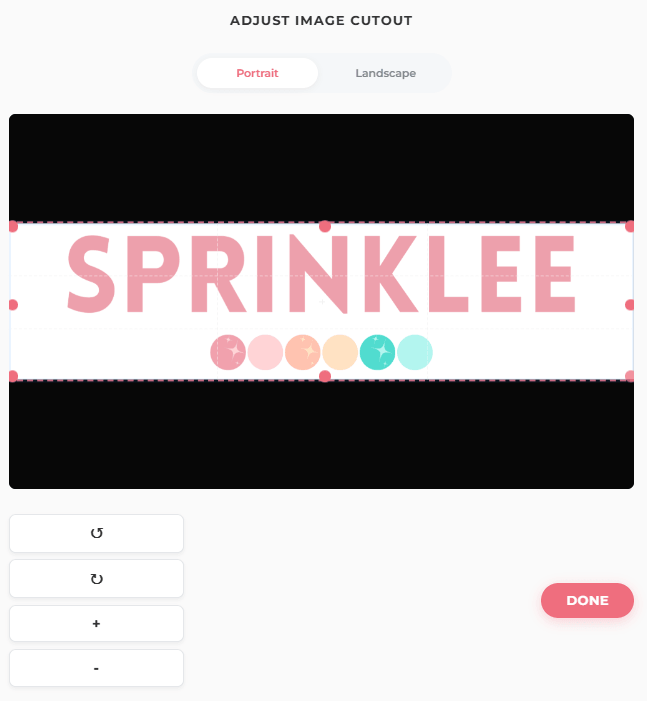
- Adjust the image crop (which part of the image you want to print). If necessary, rotate or zoom the selected image using the menu buttons, then press - Done. Text can be added later if needed.
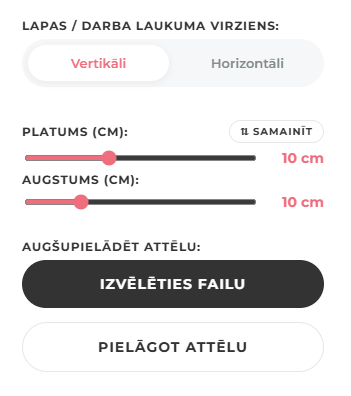
- At any time you can change the size of the printable image using the height and width sliders (this size will be for your ordered printed rectangle or square), as well as the page orientation vertical or horizontal, depending on the image orientation. If you need to make any changes to the image crop (for example, move it or change the distance), choose adjust image.
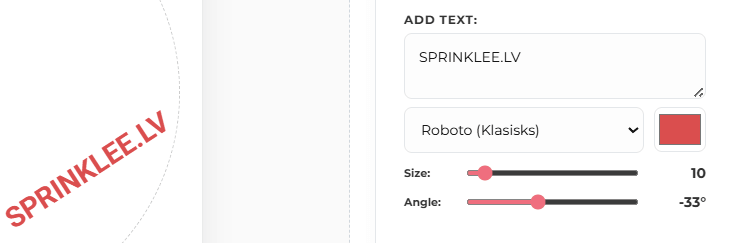
- If necessary, add text to your image, change the font, color, size, and also the angle of the text placement using the sliders. To move the text around the image, use the mouse cursor or your finger (on mobile phones).
- Check the final layout and result, because exactly this design will be printed for you. When you are finished, enter your email address, which will be indicated when paying for the order, so we know exactly which design is the one you ordered, and save the design.
- After saving the design, don’t forget to complete the order—add it to the cart or continue to checkout in the cart.
How to use an edible image?
- How to properly use sugar paper in confectionery
- How to properly use wafer paper with edible printing